
A couple of days ago, I saw a phone notification from the Kompas app. Kompas is one of the oldest, most respected, and biggest media in Indonesia, that was founded back in 1965. I started subscribing to them after my friend, Ario, mentioned about their promo on his Threads. Despite I didn’t get the promo due to my location (outside Indonesia), I was, and still is, pretty happy with the subscription. My goal is to make sure I have my information sources from verified media, and Kompas is one of the non-partial media in Indonesia. The current Indonesian administration has been putting a blanket ban and ironfist control on the media, resulted with most of them reporting the “achievements” (or the lack thereof) of the current administrations and hyping up some corruption-rich national projects such as Indonesia’s Free Nutritious Meals.
Speaking about fascism.
Kompas, however, has been steadfast in being non-partisan and reporting things as they are. Although, I must admit, I still flinch whenever I see the word “president” in front of Prabowo “Voldembrot” Subianto. The cost of reading media runs by professionals, I guess. Perhaps those reporters, journalists, and editors in Kompas’ media room are itching to add “Voldembrot”, too. Perhaps. Hey, Kompas, blink three times if you agree.
So! The Kompas app’s notification.
It was a notification of a recent article under the “Opinion” section. An essay by Nicholas Saputra, titled “Hutan Rusak, Siapa yang Menanggungnya?” This essay piqued my interest specifically because Nicholas Saputra is one of Indonesian actors that… you would say, on the similar vein of Leonardo DiCaprio: Public branding of eco-conscious warrior with highly questionable personal persona. DiCaprio with his tendency of dating girls under 25 years old while he’s growing older any day, Nicholas with his silence despite his stardom status and his supposed ability and access in voicing out on whatever is going on in Indonesia. It has been known among Indonesians that Nicholas is close with Prabowo’s son, Didit, hence his silence.
Now, I can’t reaaaally be bothered to translate the whole thing, so you will need to make do with it or use translation tool in case you are interested in reading it. Also, I’m too irate to worry about correct grammar, so, unfortunately, you will need to give me a wide berth of tolerance as I’m putting some paragraphs here with my commentaries. This is the link to the full essay: Hutan Rusak, Siapa yang Menanggungnya? (in Indonesian)
Beberapa tahun lalu, saya terhubung kembali dengan seorang anak muda di Aceh yang sampai sekarang masih saya ingat. Ia dulu sering membantu mengantar saya ketika melakukan perjalanan ke Aceh. Pada suatu masa, ia bekerja mengangkut kayu secara ilegal dengan mobil sederhana yang biasa disebut ”becak”. Saya tahu apa yang dilakukannya salah dan mencoba meyakinkannya untuk berhenti. Namun, jawabannya sederhana: ”Kami lapar, Bang.” Beberapa waktu kemudian, saya mendengar bahwa ia ditangkap dan dipenjara.
Right off the bat, he opened his essay with his interaction with an Acehnese youth. This looks impressive, until you realized that this is his way of saying, “see, I am knowledgeable! I care about Indonesia because I had a chat with a guy from Aceh!”
This gives me the vibe of “I have Black friends, too!”
Kisah itu mengingatkan saya bahwa persoalan lingkungan hampir selalu memiliki dimensi manusia. Ketika kita meminta seseorang berhenti melakukan sesuatu yang salah, kita juga harus mampu menghadirkan pilihan yang benar dan masuk akal bagi kehidupannya. Jika tidak, kita mungkin berhasil menghentikan satu aktivitas hari ini, tetapi gagal menyelesaikan alasan yang membuatnya terus terjadi.
The second paragraph PISSES ME OFF. This is what bootlickers usually say to reduce people’s concerns: “If you can’t provide any solutions, you shouldn’t criticize!”
Heck no???
Because it’s literally the government’s job??? That Aceh guy wouldn’t have to resort to illegal means to survive had the government actually doing their fucking job??? ALSO, WE PAID THE GOVERNMENT IN FORM OF TAXES AND I DEMAND TO HAVE MY TAXES BEING USED PROPERLY SO THERE WILL BE NO MORE PEOPLE IN THE SAME SITUATION AS THE ACEH GUY THAT YOU HAD A CHAT WITH, HM, NICHOLAS?
Sure, “provide the solution, too!” would work if, say, I told my son to study better for his finals, so I provide him the solution by supporting his studies. But why should I provide solutions for the things that happened because of the government’s incompetence? Dia yang bego, kenapa gw yang repot??
Pertanyaan yang perlu kita ajukan bukan semata-mata bagaimana membangun kembali, melainkan apakah kita benar-benar mendengarkan peringatan yang sudah lama disampaikan oleh alam dan ilmu pengetahuan.
WE DID.
WE. FUCKING. DID.
Indonesian Meteorology, Climatology, and Geophysical Agency had warned the risk of increasing hot spots that causing forest fires back in May 2026!
But guess who refused to listen to it? Guess who axed the budget? THE VERY SAME GUY THAT HIS BOOTS YOU ARE CURRENTLY LICKING, NICHOLAS. PRABOWO. VOLDEMBROT.
Selama ini, biaya untuk menjaga alam sering dianggap sebagai cost center, sementara biaya akibat kegagalan menjaganya jarang dihitung secara serius. Padahal, biaya itu tetap ada. Hanya, sering kali bukan mereka yang mengambil keputusan di ruang rapat yang menanggungnya, melainkan masyarakat yang tinggal di sekitar hutan, di lereng gunung, di daerah aliran sungai, dan di wilayah yang memiliki keterbatasan akses terhadap pelayanan dasar.
And this is what you get when you are worshipping capitalism and thinking that capitalism would save your ass (it’s not. Case in point: USA.) The problem with capitalism is that it sees everything with dollar signs on it. You are considered as valuable if you give something in return/quid pro quo. This means, if you can’t give any output, or your output is less than what others invest on you, you are worthless. Do you know who are the “worthless”? Children and elderly. Children would be deemed as worthless until they reach adulthood and join the workforce (productive age), and elderly is deemed as worthless because they are “past their prime”. I want to know your thoughts when the government thinks your parents or grandparents are worthless.
A country is not a profit center. In Islam, humans are appointed by Allah SWT as the khalifah, Allah’s steward in the dunya. It is expected for the humans to explore and manage the world and its affairs as best as they could with knowledge and wisdom (amanah). In short, a country is a liability for its leaders. In Indonesian, we have the saying: “Memanusiakan manusia“. Treat other humans like humans, with humanity. Looking at how Voldembrot has been treating Indonesians, well, I would say that no-one would miss him when he got dragged and quartered. I know that we all are rooting for that blood clot or the bathroom floor.
In that paragraph, Nicholas mentioned on how the decision makers are mostly those who not living with the consequences. Had he grown a spine, he would, and could, wrote a scathing yet deserving critics on the current administration. Then again, nooooo, he still decided not to.
Saya juga melihat masyarakat yang memiliki cara berbeda untuk hidup berdampingan dengan alam. Di salah satu komunitas masyarakat adat peladang tradisional di Kalimantan yang sering saya kunjungi, saya menyaksikan bagaimana mereka menerapkan kehidupan yang berkelanjutan. Mereka membagi wilayah menjadi hutan keramat yang tidak boleh diambil apa pun darinya, hutan untuk pemanfaatan, ladang, dan permukiman. Aturan tersebut bukan sekadar pembagian ruang, melainkan ilmu pengetahuan yang diwariskan dan dipraktikkan untuk menjaga keberlanjutan kehidupan.
Another one of “I went to Kalimantan! Look at me, I’m such an eco-conscious guy!”
Ugh.
Sayangnya, masyarakat adat yang selama turun-temurun menjaga hutan kerap masih menghadapi kesulitan memperoleh pengakuan atas wilayah adat, sementara akses terhadap pendidikan, kesehatan, dan pelayanan dasar juga belum selalu memadai. Dalam pertemuan terakhir saya dengan seorang tetua di sana, ia menyampaikan kalimat sederhana yang sulit saya lupakan: ”Saya hanya mau hutan kami tetap ada.”
So? What’s next? You, Nicholas, with your celebrity status and the number of followers that you have, spanning from Indonesia to Malaysia and its neighboring countries, you could voice out the tanah adat elders’ concerns in every public and government forums. You could raise public awareness on what’s going on with people outside Java, what with your trips and visits to those places such as Aceh and Kalimantan. You could, on behalf of those tribes and voiceless people, raise your voice and point your fingers to those who are responsible for all this mess and demand for better changes because you, just like any other Indonesians, have been paying your taxes and breathe the same air like them.
Did you do it, though? Or are you perhaps too busy attending those gala and parties held by Didit?
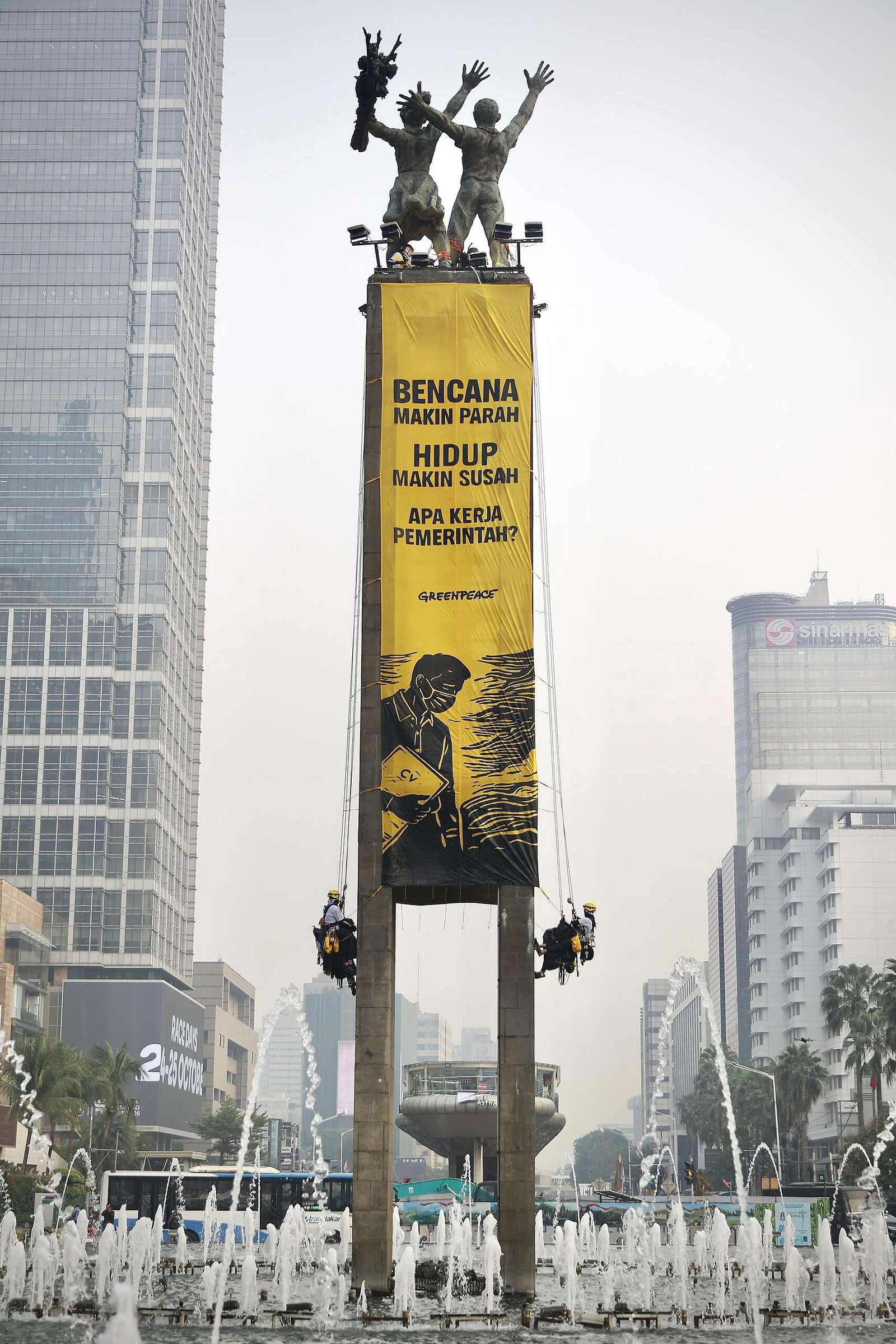
The rest of the essay was… Superficial. All the words, all the texts, none of the importance or clear actions. I sniffed a really strong of “Takut Bikin Bokap dan Oom Sobat Gw Marah“-vibe from the whole thing, and a really desperate attempt by Nicholas trying to be relevant while his branding deteriorating. That long-ass essay didn’t hold a candle to what the folks from Greenpeace Indonesia did when they scaled the freaking Tugu Selamat Datang and spread out a gigantic banner with critics to the government.
And all because he chooses to “stay neutral”.